
Applies to:
- CI People Directory - Enterprise Clients
- CI People Directory - Marketing Subscribers
- CI People Directory - Research Subscribers
Issue/Functionality Sought:
- What are “Documents Provided By Person” in the CI People Directory?
- How to find self-reported documents in the CI People Directory?
- Where to find self-reported documents in the CI People Directory?
Tactical Rundown:
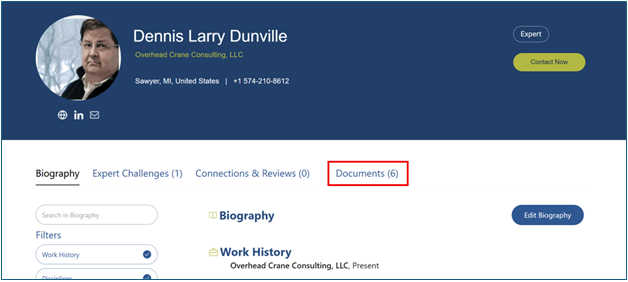
Step 1: Go to the Documents Tab
To locate documents that an individual has personally uploaded, navigate to the “Documents” tab within their profile.
Step 2: Locate the Self-Reported Folder
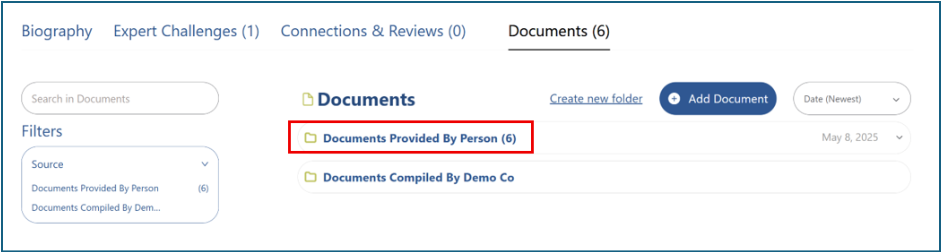
Look for the folder labeled “Documents Provided By Person.”
If the individual has uploaded any files, you will see the number of documents listed in parentheses next to the folder name.
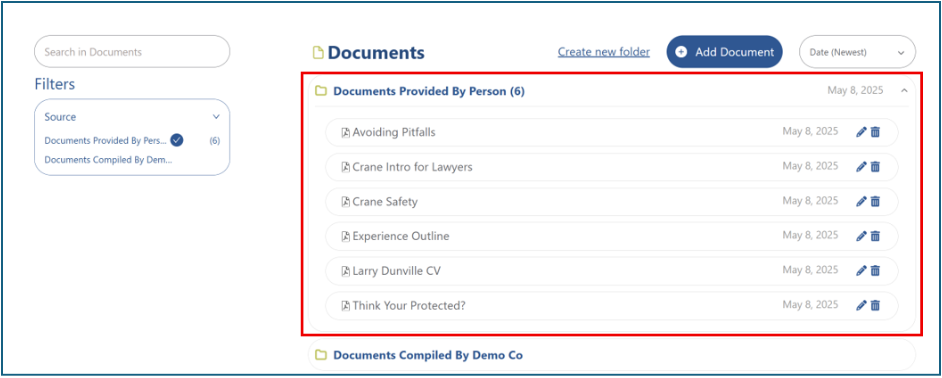
Step 3: Open the Folder
Click the folder to open it and view the documents they have provided.
Still Need Help?
If you still have questions or experience issues, our Customer Care team is here to help. Contact us by email (customercare@courtroominsight.com) or phone (415-593-1499 x405) to get connected with a team member within 24 hours.