
Applies To:
- CI People Directory - Enterprise Clients
- CI People Directory - Marketing Subscribers
- CI People Directory - Research Subscribers
Issue/Functionality Sought:
- What to do if I find a duplicate profile in the CI People Directory?
- What to do if there are two profiles who appear to be the same person in the CI People Directory?
- How to alert CI of a duplicate profile in the CI People Directory?
- How do I fix a duplicate profile in the CI People Directory?
Tactical Rundown:
Because the CI People Directory allows user-generated additions, duplicate profiles may occasionally appear. Our team actively works to resolve these, but we appreciate being alerted if you notice one. If you come across a potential duplicate, please flag the profile and include a note indicating that you believe it is a duplicate. By the end of this article you will be able to:
- Report a duplicate profile
- Navigate the reporting process
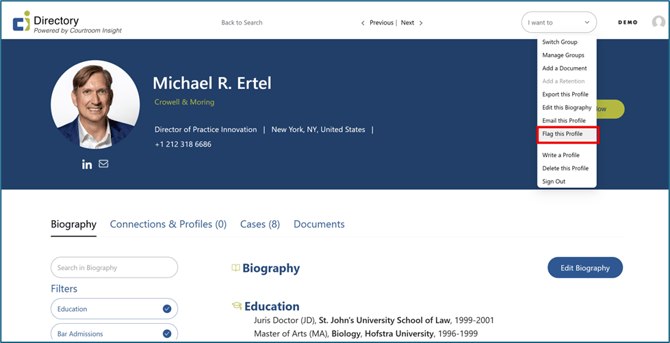
Select “Flag this Profile”
Open the “I want to” drop-down menu on the profile believed to be a duplicate.
Select the 8th button from the top, titled “Flag this Profile.”
An email to our Customer Care team will automatically open.
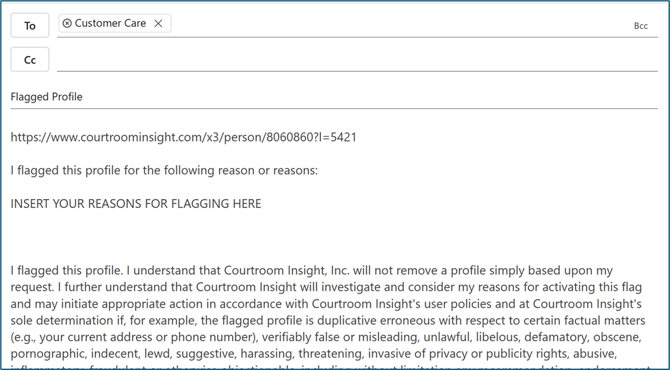
Submit Your Reason for Flagging
In the section labeled INSERT YOUR REASONS FOR FLAGGING HERE, note that you suspect the profile is a duplicate.
A link to the profile you flagged will be included automatically; however, please also paste the URL of the other profile, which is believed to be a duplicate.
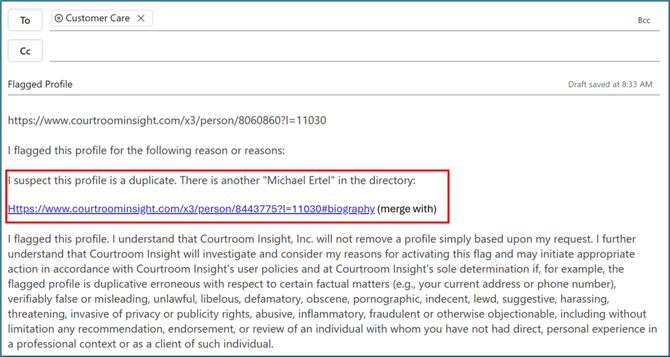
Our team will review the profiles and merge them if they are confirmed to represent the same individual.
Still Need Help?
If you still have questions or experience issues, our Customer Care team is here to help. Contact us by email (customercare@courtroominsight.com) or phone (415-593-1499 x405) to get connected with a team member within 24 hours.