
Last Updated: 1/28/26
Applies to:
- CI People Directory - Enterprise Clients
- CI People Directory - Research Subscribers
Issue/Functionality Sought:
- How to use expert challenge filters in the CI People Directory?
- Where to find expert witnesses who have been involved in expert challenges in the CI People Directory?
- How to filter expert search results based on Expert Challenge participation or outcomes?
- How to identify experts with specific challenge types?
- How to quickly refine expert research using Expert Challenge data in the CI People Directory’s new UI?
Solution Overview:
This article explains how to use the Expert Challenge filters in the CI People Directory to quickly surface experts with relevant challenge history. By following the steps below, you will be able to:
- Access Expert Witness search results
- Apply Expert Witness Challenge-specific filters
- View filtered results in real time
Tactical Rundown:
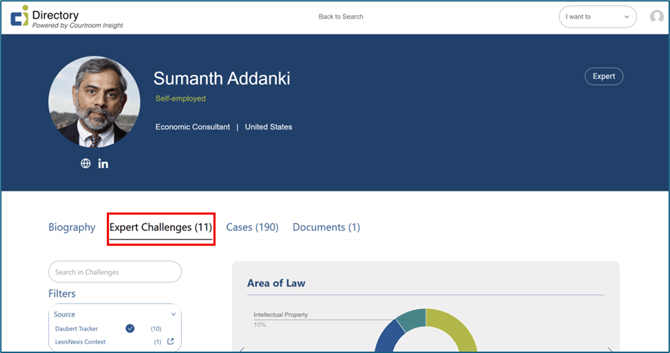
Select the “Expert Challenges Tab”
From the main navigation page on CI’s website, search for the specific expert witness you’re looking for challenge information about. Navigate to their profile page. Once on their profile page, find the “Expert Challenges” tab, next to “Biography”.
Understanding Expert Challenge Data Sources
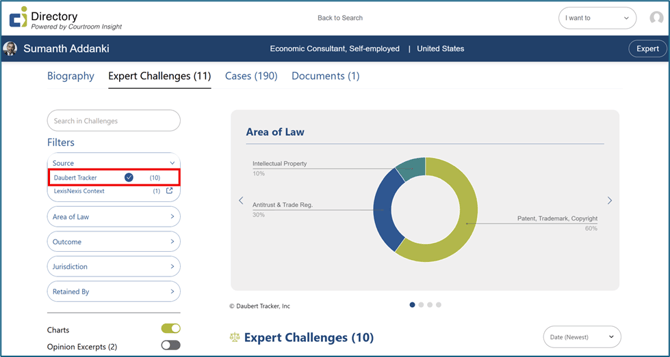
CI’s Expert Challenge filters are powered by one of more data sources, depending on your firm’s subscriptions. These sources determine what challenge-related information is available when researching experts. The two expert challenge sources available on CI include Daubert Tracker and LexisNexis Context.
Daubert Tracker (Included with all CI Subscriptions)
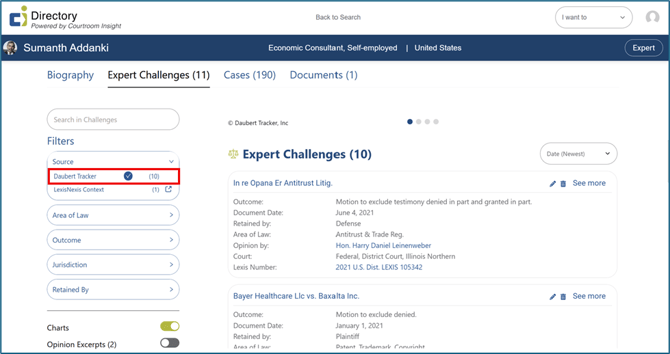
Daubert Tracker is licensed by CI on behalf of its clients and provides foundational Expert Witness Challenge data in CI. This includes information that allows you to filter experts based on:
- Challenges: Whether they have been challenged
- Admissibility: The type of admissibility challenge
- Outcome: The outcome of those challenges, when available
See the “Daubert Tracker” integration partner article for more information.
LexisNexis Context (Optional Subscription)
Firms that subscribe to LexisNexis Context will see additional Expert Challenge in CI.
The LexisNexis Context Integration includes:
- Expanded challenge and treatment history
- Related case law and judicial analysis
- Broader litigation and expert context
See the “LexisNexis” integration partner article for more information.
Adding Expert Challenge Filters
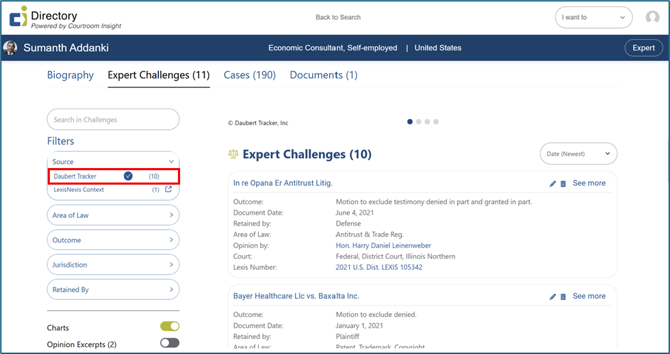
Under “Filters” on the left side of the screen, you can navigate between the different sources of data; Daubert Tracker and LexisNexis Context. As described above, Daubert Tracker data is available with all subscription types, but LexisNexis Context requires an additional subscription by your firm. If your firm doesn’t pay for LexisNexis, their data will not be visible to you; only Daubert Tracker.
Still Need Help?
If you still have questions or experience issues, our Customer Care team is here to help. Contact us by email (customercare@courtroominsight.com) or phone (415-593-1499 x405) to get connected with a team member within 24 hours.