
Last Updated: 1/29/26
Applies to:
- CI People Directory - Enterprise Clients
- CI People Directory - Marketing Subscribers
- CI People Directory - Research Subscribers
Issue/Functionality Sought:
- How do I download my search results into an Excel spreadsheet?
- How do I export a filtered list of professionals directly from the CI People Directory?
- Where do I find the Excel export option on search results pages?
- How do I generate a spreadsheet of attorneys, experts, judges, and neutrals based on my search filters?
Solution Overview:
CI allows users to export any directory search results into an Excel spreadsheet, making it easy to review, compare, or analyze multiple profiles at once. The Excel export includes all visible columns from the results page and reflects any filters or search criteria applied. This article explains where to find the export option and how to download your results in structured, spreadsheet format.
Tactical Rundown:
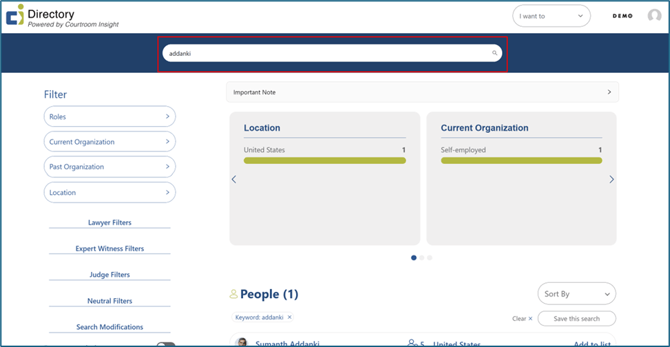
Navigate to the Search Bar
Click on the search bar of the home page and enter the keyword(s) you want to search, apply filters if needed. Click enter on your keyboard to retrieve search results.
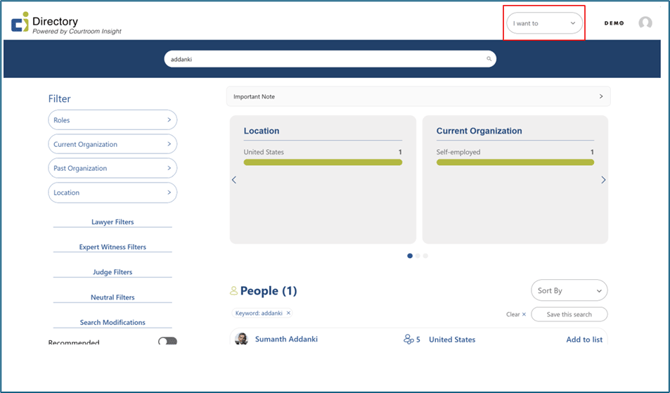
Locate the “I want to” Button
On the top right of the page, find the “I want to”, and click the arrow to show a drop-down menu.
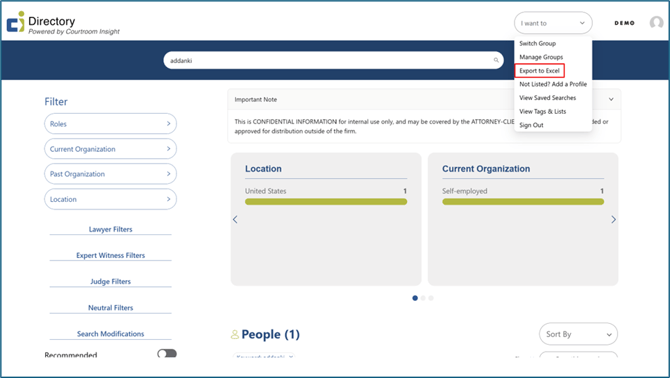
Find and Click the “Export to Excel” Button
Select “Export to Excel”. An export summary of your search results will automatically be downloaded to an Excel sheet.
Accessing Your Downloaded Excel Spreadsheet
Your Excel Spreadsheet of this profile will be found in “Downloads” on your computer title bar, and in the downloads folder in your files.

Still Need Help?
If you still have questions or experience issues, our Customer Care team is here to help. Contact us by email (customercare@courtroominsight.com) or phone (415-593-1499 x405) to get connected with a team member within 24 hours.