
Last Updated: 1/27/26
Applies to:
- CI People Directory - Enterprise Clients
- CI People Directory - Marketing Subscribers
- CI People Directory - Research Subscribers
Issue/Functionality Sought:
- What does “Experience With” mean in the CI People Directory?
- How is the “Experience With” filter triggered?
- Which types of firm interactions trigger experience attribution in CI?
- Why does a profile appear (or not appear) under the “Experience With” filter?
- How can I confirm that my firm’s activity and relationships are accurately reflected in CI?
Solution Overview:
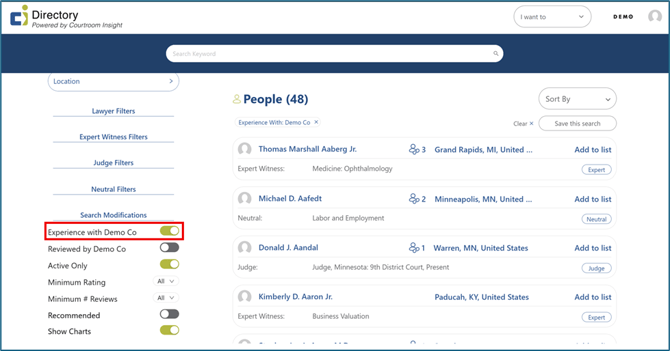
The “Experience With” filter indicates that a person has had a documented professional interaction or relationship with your firm.
This article explains:
- What the “Experience With” filter means
- The four ways experience is triggered in the CI People Directory
- How that experience is reflected on a profile
By the end of this article, you will understand why a profile appears under this filter and how CI determines firm experience.
Tactical Rundown:
1: What “Experience With” Means
When a profile appears under the “Experience With” filter, it means this person has had a verifiable interaction with your firm, based on CI-tracked activity or your organization’s contributed data.
This does not imply endorsement, only documented experience.
 2: The Four Ways Experience is Triggered
A person will appear as having “Experience With” your firm if any one of the following occurs:
- Expert Witness Retention
- Your firm has retained an expert on a matter
- The relationship was documented through CI data sources or firm-provided information
- Research Performed on a Profile
- Someone at your firm intentionally researched an individual using their CI profile
- This includes actions taken while logged into CI, such as:
- Viewing the individual’s profile
- Saving the profile
- Engaging with profile content (e.g., notes, tags, or other interactions)
- Simply seeing an individual’s name or profile appear in search results or recommendations does not count as research and does not trigger experience
- Written Review
- A member of your firm submitted a written review of the individual
- Reviews may be internal or shared, depending on permissions
- Connection
- The individual is directly connected to your firm through CI relationship mapping
- Connections may come from CRM integrations, firm submissions, or verified relationship data
Any single trigger is sufficient for the experience to be recorded.
How Experience Appears on a Profile
Once triggered:
- The profile becomes discoverable when filtering by Experience With
- The experience reflects firm-level interaction, not necessarily individual attorney interaction
- Visibility depends on your subscription level and permissions
Still Need Help?
If you still have questions or experience issues, our Customer Care team is here to help. Contact us by email (customercare@courtroominsight.com) or phone (415-593-1499 x405) to get connected with a team member within 24 hours.