
Last Updated: 1/29/26
Applies to:
- CI People Directory - Enterprise Clients
- CI People Directory - Marketing Subscribers
- CI People Directory - Research Subscribers
Issue/Functionality Sought:
- What is the difference between Thumbs and Handshakes in the CI People Directory?
- What are Thumbs in the CI People Directory?
- What are Handshakes in the CI People Directory?
- How do Thumbs function?
What do Thumbs and Handshakes represent? - How can your firm configure or disable Thumbs and Handshakes by role?
Solution Overview:
This article explains the differences between Thumbs and Handshakes in the CI People Directory, including how each interaction is used, what is represented, and how firms can configure availability by role or disable features entirely.
By the end of this article, you will understand:
- What Thumbs represent and how they are used
- What Handshakes represent and how they function
- How Thumbs and Handshakes are triggered and customized by firms
Tactical Rundown:
Understanding Thumbs
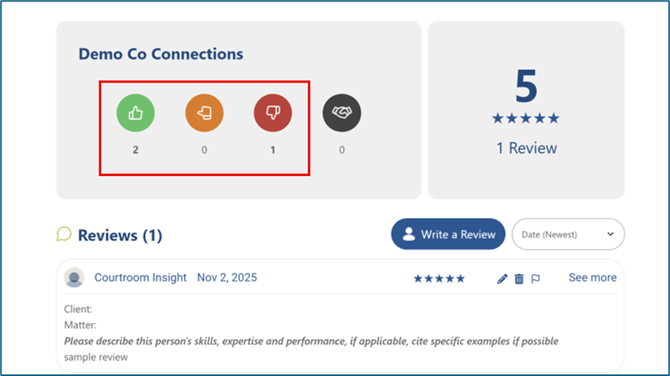
Thumbs represent a rating-based interaction in the CI People Directory.
- Thumbs allow users to provide feedback on a professional or interaction
- Ratings can be:
- Positive (Green Upright Thumb)
- Neutral (Orange Horizontal Thumb)
- Negative (Red Downward Thumb)
- Thumbs are subjective and reflect a user’s opinion or experience
Thumbs are designed to give quick sentiment-based feedback rather than formal evaluations.
Understanding Handshakes
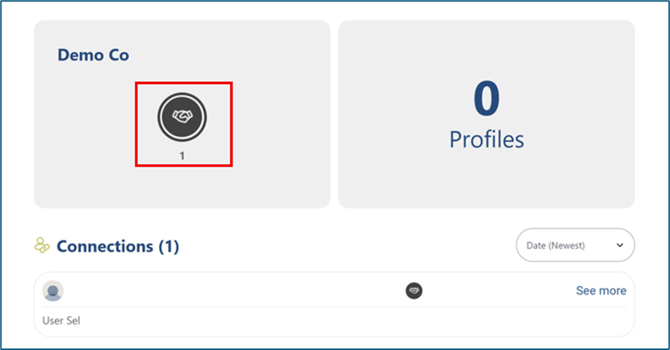
Handshakes are a neutral interaction in the CI People Directory.
- A Handshake represents a confirmed professional interaction or connection
- Handshakes are not ratings and do not indicate positive or negative sentiment
- They are intended to validate that a connection or interaction occurred
Handshakes focus on factual relationship data rather than opinion.
How Thumbs and Handshakes are Triggered
Each firm controls how Thumbs and Handshakes are used within their organization.
Firms can:
- Enable or disable Thumbs and/or Handshakes
- Configure availability by user role
- Turn features off completely if desired
Configuration decisions are made at the firm level to align with internal policies and workflows.
While both Handshakes and Thumbs must be created manually, submitting a review will trigger a Handshake connection. This ensures accuracy and intentional relationship building within the platform.
Still Need Help?
If you still have questions or experience issues, our Customer Care team is here to help. Contact us by email (customercare@courtroominsight.com) or phone (415-593-1499 x405) to get connected with a team member within 24 hours.